A Simple Static Site Generator
Table of Contents
A Simple Static Site Generator: Writing Made Easy!⌗
In a world full of Content Management Systems (CMS) like WordPress and Wix, where most solutions rely on backends, I found an exception – Hugo. In this blog, I’ll walk you through my journey of implementing a straightforward framework that doesn’t require coding expertise.
The Lightbulb Moment⌗
My goal was to have a lightweight system that allowed me to focus on writing without the hassle of backend servers and associated costs. While WordPress does offer free options, they often come with complex setups. Little did I know about Hugo, a static site generator that simplifies website creation. I may have been reinventing the wheel, but the learning experience was invaluable.
My Toolbox⌗
I decided to stick with free tools for my project, making the following assumptions:
- GitHub Pages are free.
- I have a ChatGPT Plus subscription.
- I know my way around frontend technologies (HTML, CSS, JS).
- I have an established brand - BAO Photography.
Let’s Get Started⌗
My approach was to create a framework that generates static HTML pages and host them on GitHub Pages. I would also leverage ChatGPT to do most of the coding heavy lifting. Don’t worry; you don’t need to be a coding wizard to follow along.
Step 1: Creating a Basic HTML Page⌗
You can start by asking ChatGPT to generate a basic HTML page with a title and a tagline. Feel free to add your own styles and components. For my blog, I included a container for the list of blog posts.
Step 2: Presenting Blog Posts⌗
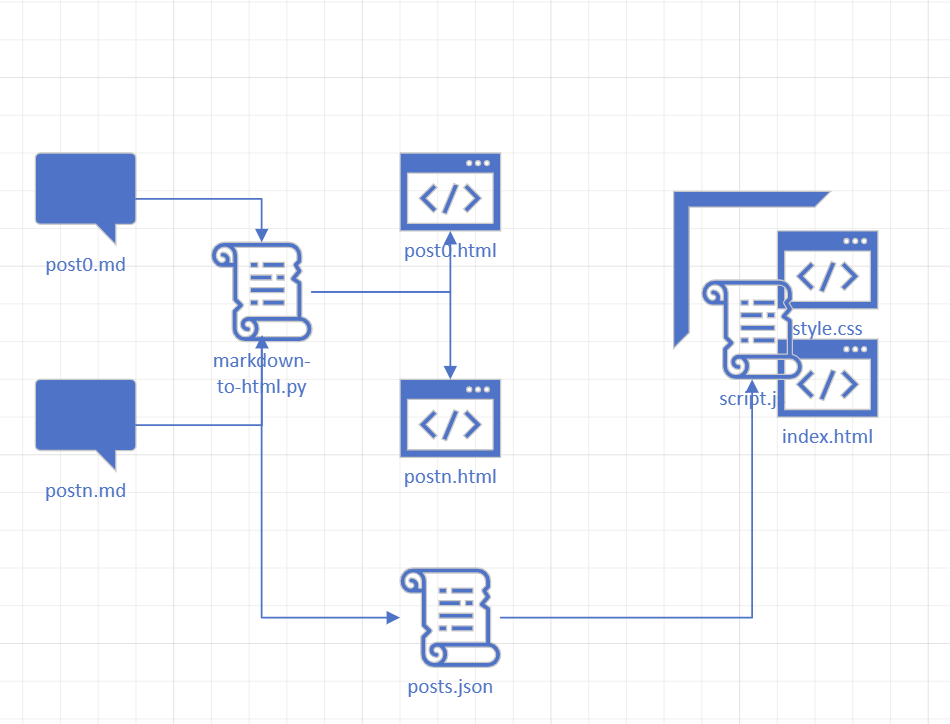
I decided to present each blog post as an HTML page. I wrote my blog posts in Markdown and used a Python script generated with ChatGPT to convert Markdown to HTML. This script also compiled the list of blog posts and generated a JSON file with post metadata.
Step 3: Displaying Posts⌗
To display my blog posts, I populated the container on the main page using the JSON metadata. This process happens relatively dynamically, meaning we load the JSON file and populate the HTML container when the client loads the page. To achieve this, I used iframes to display the posts.
Step 4: Writing Blog Posts⌗
I created a Powershell script that generates a new blog post file with a predefined template. The script automatically names the file and increments the post number.
Step 5: Execute and Publish⌗
With everything set up, I executed my scripts and pushed the changes to my GitHub repository.
In a Nutshell⌗
This simple framework allowed me to generate static HTML pages and host them on GitHub Pages effortlessly. ChatGPT played a crucial role in automating various tasks, making my life easier. While AI is undoubtedly a powerful tool, I believe that the human touch and creativity will always have a place. It’s all about adapting and learning new skills to stay ahead in an ever-changing landscape.
Conclusion⌗
So, why spend days on complex setups when you can create your website in an evening? Get creative, write, and let AI do the heavy lifting – it’s a win-win situation! 😄